
Contract Modifications
Contractual Changes
Extension of an Agency Temp
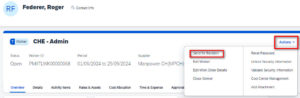
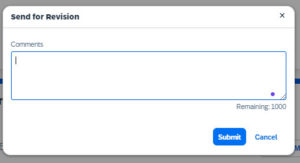
If you planned to extend an Agency temp please enter in Fieldglass on Worker’s page or Assignment’s page and click on Action -> Send for Revision and let AGS / Manpower team knows how long you want to extend the Agency Temp (See imagine below)
If AGS receives the notification for a validated change request:
- AGS will do the change in Fieldglass
- Manpower will do the change in our systems as per requested date and issue new contract, if needed, for your worker
1.
2.
With the recent implementation of Fieldglass for creating Purchase Orders, the updated procedure for extending into the new year is as follows:
-
AGS will launch an extension until end of 2026
-
Manager and the Cost center owner will need to approve it
-
AGS will create a new Job posting from January 2027 until the requested end date
-
The CC owner will need to approve the new Job Posting
- AGS will create the Assignment.
- The Manager will need to approve it
- Manpower will update our internal system and contract accordingly, if needed
Salary Increases
The Salary Increase inquiry need to be requested by the Engagement Manager(EM) to AGS.
As part of PMI ongoing efforts to ensure fair and consistent compensation practices in addition to gaining better control over our Third-Party Worker (TPW) spend, the following guidelines have been established for rate reviews relating agency temps. Please review these guidelines carefully and adhere to them when considering any rate adjustments for agency temps.
Minimum Tenure
- Agency temps must have a minimum of 12-months of tenure before any rate review can be considered.
- Exceptions to this rule apply only if the agency temp is being moved into a different role with a higher pay rate based on seniority or role content.
Frequency of Reviews
- Rate reviews for agency temps are limited to once a year.
- Additional reviews within the same year will only be considered if the worker is being moved into a different role with a higher pay rate based on seniority of role or role content.
Cap on Rate Increases
- Rate reviews for agency temps are capped at 1.5 % per year.
- The percentage increase proposed should never exceed the annual average recommended rate increase that PMI is offering to their permanent headcount in any given year.
Approval Process
- All rate review recommendations for agency temps must be approved by your supervisor / AGS / PMI vendor management team before any communication with the agency temp or Manpower Switzerland is made.
The Manpower Team will handle the admin tasks to ensure the correct update of the salary increase within our tools and communication to the Agency Temp.
Cost Center Change Process
-
AGS will create a new Job posting under the new cost center
- The cost center owner will need to approve the new Work Order
- AGS will create the Assignment.
- The Engagement Manager will need to approve it.
- AGS will reduce the PO value under the previous cost center.
Account transfer from PMI to Manpower SA
The Manpower Team with the PMI Global Talent Acquisition Team have worked together to ensure a proper and correct IMDL transfer process.
As a Engagement Manager please follow the steps below:
- Sign a new contract for the Agency Temp with Manpower SA
- Request leaving action in MyPMI to terminate contract with PMI
- Send a general request via MyPMI to trigger the IMDL account conversion. The request must include:
- Effective date
- Supervisor name
- Agency Temp Name
- Vendor Name: Manpower SA
Transfer from Manpower SA to PMI
If you want to convert an Agency Temp to a PMI employee, you need to agree the leaving date and offboarding with Manpower SA.
When requesting the new hiring in MyPMI , please advise this is a conversion and add the existing IMDL temporary workers account number to be transferred by Interact